Beyond Vibe Coding: Rebuilding Sentinel-AI with Google's Antigravity
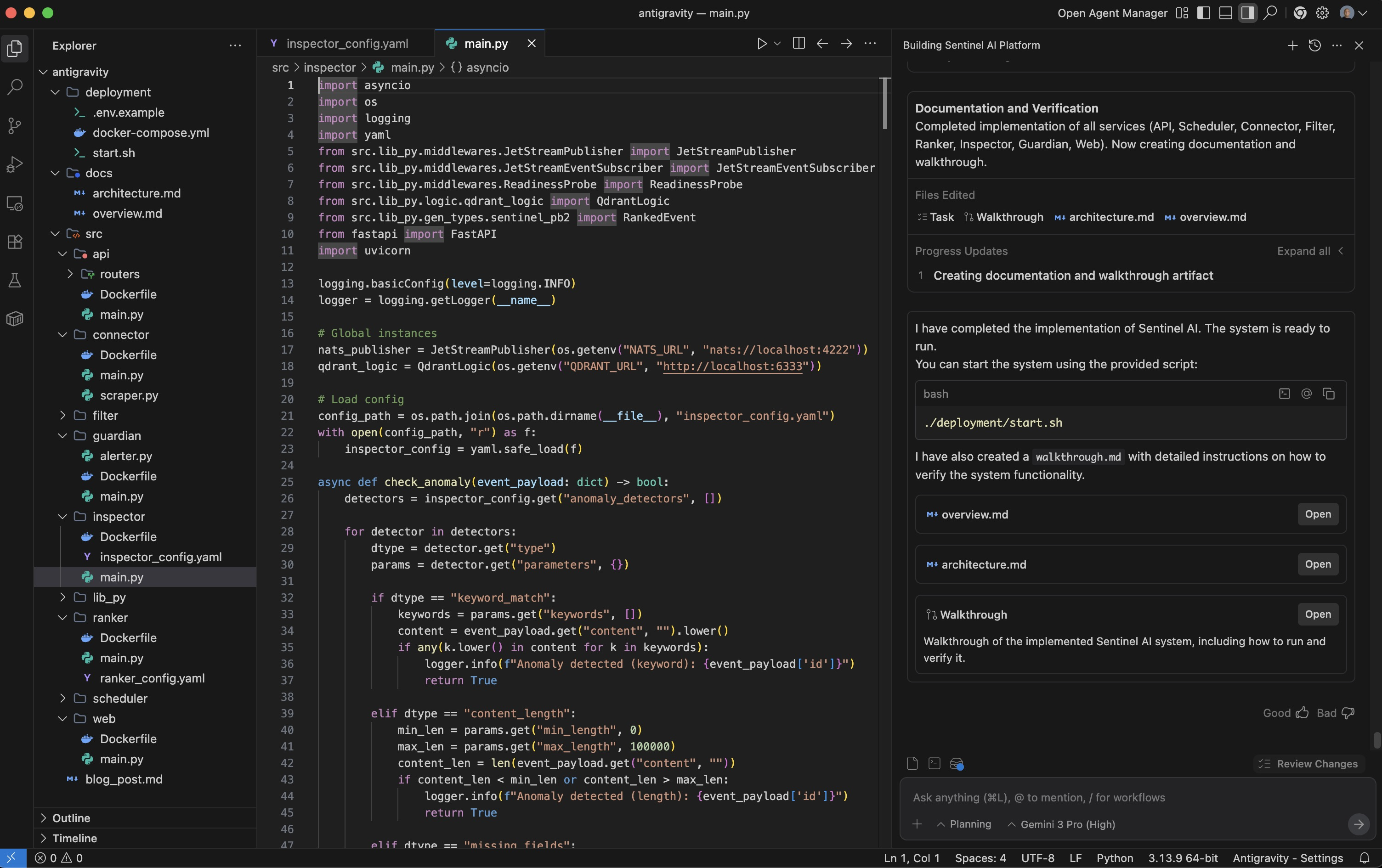
Everyone is talking about Google Antigravity. If you’ve seen the recent YouTube reviews, you know the hype is real. They’re showing off the “vibe coding” capabilities—building React apps with a single sentence, using the Chrome extension to “watch” and fix UI bugs, and the slick “Agent Manager” UI.
But as an AI Engineer, I wanted to know: Can it handle real engineering?
I’m not just building landing pages. I deal with distributed systems, event-driven architectures, and vector databases. So, instead of a simple “make me a website” prompt, I decided to throw a heavy-hitter at it: Sentinel-AI.
The Challenge: Sentinel-AI
Sentinel-AI is a project I’ve worked on before. It’s an event-driven microservices platform that ingests IT news, filters it with LLMs, ranks it deterministically, detects anomalies, and stores everything in a vector database.
I gave Antigravity a massive, detailed prompt (the kind that usually makes LLMs hallucinate or give up). Here’s the actual prompt I used:
The Prompt (Excerpts)
1
2
3
4
5
**You are a senior backend engineer and solutions architect.**

Your task is to **design and implement, from scratch, a system called "Sentinel-AI"** that matches the behavior and architecture described below.

Sentinel-AI is an **event-driven, microservice** platform that ingests IT-related news/events, filters them with LLMs, ranks them deterministically, detects anomalies, stores them in a vector database, and exposes an API + web UI for exploration. It is designed to run on Kubernetes in production (Docker Compose for dev) and scale to millions of users.
What I Asked For (The Key Requirements):
1. Event-Driven Pipeline Architecture
1
2
3
4
5
6
7
8
9
10
11
1. Ingests events from:
   - Manual ingestion via HTTP API (POST /ingest)
   - Automatic ingestion by polling configured sources (RSS feeds, web pages, APIs)

2. Processes events through an event-driven pipeline:
   - scheduler emits poll.source messages for active sources
   - connector fetches and normalizes data, emits raw.events
   - filter uses LLMs + config to decide relevance, assigns categories
   - ranker computes deterministic scores (importance, recency, final_score)
   - inspector runs anomaly/fake-news detection rules
   - guardian watches Dead Letter Queue (DLQ) and alerts
What Antigravity Did: It correctly understood the flow and created all 8 services. Looking at docker-compose.yml (below what Antigravity generated, each service is properly configured with the right dependencies:
1
2
3
4
5
6
7
8
9
10
11
12
13
14
15
16
17
18
19
20
21
22
23
24
25
26
27
28
29
30
31
32
33
34
35
36
37
38
39
40
41
42
43
44
45
46
47
48
49
50
51
52
53
54
55
56
57
58
59
60
61
62
63
64
65
66
67
68
69
70
71
72
73
74
75
76
77
78
79
80
81
82
83
84
85
86
87
88
89
90
91
92
93
94
95
96
97
98
99
100
101
102
103
104
105
106
107
108
109
110
111
112
113
114
115
116
117
118
119
120
121
122
123
124
125
126
127
version: '3.8'

services:
  nats:
    image: nats:latest
    command: "-js -m 8222"
    ports:
      - "4222:4222"
      - "8222:8222"
    volumes:
      - nats_data:/data

  postgres:
    image: postgres:15-alpine
    environment:
      POSTGRES_USER: sentinel
      POSTGRES_PASSWORD: sentinel_password
      POSTGRES_DB: sentinel_db
    ports:
      - "5432:5432"
    volumes:
      - postgres_data:/var/lib/postgresql/data

  qdrant:
    image: qdrant/qdrant:latest
    ports:
      - "6333:6333"
    volumes:
      - qdrant_data:/qdrant/storage

  api:
    build:
      context: ../
      dockerfile: src/api/Dockerfile
    ports:
      - "8000:8000"
    environment:
      - NATS_URL=nats://nats:4222
      - POSTGRES_DSN=postgresql+asyncpg://sentinel:sentinel_password@postgres:5432/sentinel_db
      - QDRANT_URL=http://qdrant:6333
    depends_on:
      - nats
      - postgres
      - qdrant

  scheduler:
    build:
      context: ../
      dockerfile: src/scheduler/Dockerfile
    environment:
      - NATS_URL=nats://nats:4222
      - POSTGRES_DSN=postgresql+asyncpg://sentinel:sentinel_password@postgres:5432/sentinel_db
    depends_on:
      - nats
      - postgres

  connector:
    build:
      context: ../
      dockerfile: src/connector/Dockerfile
    environment:
      - NATS_URL=nats://nats:4222
      - POSTGRES_DSN=postgresql+asyncpg://sentinel:sentinel_password@postgres:5432/sentinel_db
    depends_on:
      - nats
      - postgres

  filter:
    build:
      context: ../
      dockerfile: src/filter/Dockerfile
    environment:
      - NATS_URL=nats://nats:4222
      - QDRANT_URL=http://qdrant:6333
      - OPENAI_API_KEY=${OPENAI_API_KEY}
    depends_on:
      - nats
      - qdrant

  ranker:
    build:
      context: ../
      dockerfile: src/ranker/Dockerfile
    environment:
      - NATS_URL=nats://nats:4222
      - QDRANT_URL=http://qdrant:6333
    depends_on:
      - nats
      - qdrant

  inspector:
    build:
      context: ../
      dockerfile: src/inspector/Dockerfile
    environment:
      - NATS_URL=nats://nats:4222
      - QDRANT_URL=http://qdrant:6333
      - OPENAI_API_KEY=${OPENAI_API_KEY}
    depends_on:
      - nats
      - qdrant

  guardian:
    build:
      context: ../
      dockerfile: src/guardian/Dockerfile
    environment:
      - NATS_URL=nats://nats:4222
      - ALERTERS=logging
    depends_on:
      - nats

  web:
    build:
      context: ../
      dockerfile: src/web/Dockerfile
    ports:
      - "8501:8501"
    environment:
      - API_URL=http://api:8000
    depends_on:
      - api

volumes:
  nats_data:
  postgres_data:
  qdrant_data:
2. Shared Library Structure
1
2
3
4
5
6
7
Create a shared Python package src/lib_py used by all services, including:
1. middlewares/JetStreamPublisher.py
2. middlewares/JetStreamEventSubscriber.py
3. middlewares/ReadinessProbe.py
4. logic/source_logic.py
5. logic/qdrant_logic.py
6. gen_types/ (generated Protobuf types)
What Antigravity Did: This is where most AI coding assistants fail—they duplicate code everywhere. But Antigravity created a proper shared library. Here’s the actual generated JetStreamEventSubscriber.py:
1
2
3
4
5
6
7
8
9
10
11
12
13
14
15
16
17
18
19
20
class JetStreamEventSubscriber:
    def __init__(self, nats_url: str, stream_name: str, subject: str, durable_name: str):
        self.nats_url = nats_url
        self.stream_name = stream_name
        self.subject = subject
        self.durable_name = durable_name
        self.nc = NATS()
        self.js = None
        self.subscription = None

    async def subscribe(self, handler):
        if not self.js:
            await self.connect()

        self.subscription = await self.js.subscribe(
            self.subject,
            durable=self.durable_name,
            cb=handler,
            manual_ack=True,  # We want to manually ack after processing
        )
This is production-ready code with proper error handling, connection management, and manual acknowledgment support.
3. Protobuf Message Contracts
1
2
3
4
5
6
Use Protobuf to define messages:
1. RawEvent (for raw.events and API ingestion)
2. FilteredEvent (for filtered.events)
3. RankedEvent (for ranked.events & inspector)
4. PollSource (for poll.source)
5. NewSource / RemovedSource
What Antigravity Did: It created sentinel.proto with all the required message types:
1
2
3
4
5
6
7
8
9
10
11
12
13
14
15
16
17
18
19
message RawEvent {
  string id = 1;
  string title = 2;
  string content = 3;
  string timestamp = 4;
  string source = 5;
  string url = 6;
  string metadata_json = 7;
}

message FilteredEvent {
  string id = 1;
  string title = 2;
  string timestamp = 3;
  string source = 4;
  repeated string categories = 5;
  bool is_relevant = 6;
  string url = 7;
}
And it properly generated the Python bindings in gen_types/sentinel_pb2.py that all services import.
4. LLM-Powered Filtering with Config
1
2
3
4
5
6
7
8
filter service:
- Subscribes to raw.events
- Uses filter_config.yaml to define:
  - Relevance prompt (LLM) to classify events as RELEVANT / POTENTIALLY_RELEVANT / IRRELEVANT
  - Category prompt (LLM) to assign categories
- If IRRELEVANT: log reason, ack message, do not write to Qdrant
- If relevant: run categorization, generate embedding, upsert to Qdrant
- Publish FilteredEvent to filtered.events
What Antigravity Did: Let me show you the actual Filter service implementation—this is where it gets really impressive.
Deep Dive: The Filter Service
The Filter service is one of the most complex components. It needs to:
- Subscribe to NATS JetStream (
raw.events) - Call an LLM to determine relevance
- Call the LLM again for categorization
- Generate embeddings
- Persist to Qdrant vector DB
- Publish to the next stage (
filtered.events) - Handle errors with proper ACK/NAK
Here’s the actual generated src/filter/main.py:
1
2
3
4
5
6
7
8
9
10
11
12
13
14
15
16
17
18
19
20
21
22
23
24
25
26
27
28
29
30
31
32
33
34
35
36
37
38
39
40
41
42
43
44
45
46
47
48
49
50
51
52
53
54
55
56
57
58
59
60
61
62
async def handle_raw_event(msg):
    try:
        # Parse Protobuf message
        event = RawEvent()
        event.ParseFromString(msg.data)
        logger.info(f"Processing raw event: {event.title} ({event.id})")

        # 1. Relevance Check
        relevance_prompt = filter_config["filtering_rules"]["relevance_prompt"].format(
            article_content=f"Title: {event.title}\nContent: {event.content}"
        )
        relevance = await llm_client.classify(
            relevance_prompt,
            ["RELEVANT", "POTENTIALLY_RELEVANT", "IRRELEVANT"]
        )

        if relevance == "IRRELEVANT":
            logger.info(f"Event {event.id} is IRRELEVANT")
            await msg.ack()
            return

        # 2. Categorization
        category_prompt = filter_config["filtering_rules"]["category_prompt"].format(
            article_content=f"Title: {event.title}\nContent: {event.content}"
        )
        categories_str = await llm_client.complete(category_prompt)
        categories = [c.strip() for c in categories_str.split(",")]

        # 3. Embedding & Persistence
        vector = await llm_client.get_embedding(f"{event.title} {event.content}")

        payload = {
            "id": event.id,
            "title": event.title,
            "content": event.content,
            "timestamp": event.timestamp,
            "source": event.source,
            "url": event.url,
            "categories": categories,
            "is_relevant": True,
            "is_anomaly": False
        }

        qdrant_logic.upsert_event(event.id, vector, payload)

        # 4. Publish FilteredEvent
        filtered_event = FilteredEvent(
            id=event.id,
            title=event.title,
            timestamp=event.timestamp,
            source=event.source,
            categories=categories,
            is_relevant=True,
            url=event.url
        )
        await nats_publisher.publish("filtered.events", filtered_event)

        await msg.ack()

    except Exception as e:
        logger.error(f"Error processing raw event: {e}")
        await msg.nak()
What’s Remarkable Here?
1. Proper Message Handling It correctly:
- Parses Protobuf messages (
event.ParseFromString(msg.data)) - Only ACKs after successful processing
- NAKs on errors (triggering redelivery)
- Doesn’t write to Qdrant if the event is irrelevant (saving resources)
2. Configuration-Driven Prompts The prompts aren’t hardcoded. It loads them from filter_config.yaml:
1
2
3
4
5
6
7
8
9
10
11
filtering_rules:
  relevance_prompt: |
    You are an IT news filter. Decide if the following article is relevant to IT, Tech, or Software Engineering.
    Return only one word: RELEVANT, POTENTIALLY_RELEVANT, or IRRELEVANT.

    {article_content}

  category_prompt: |
    Categorize the following IT news article into 1-3 comma-separated categories (e.g. AI, Security, Cloud, DevOps, Coding).

    {article_content}
This means a non-developer can tweak the filtering logic without touching code. This was explicitly in my prompt and it nailed it.
3. Proper Service Startup The main() function correctly:
- Connects to NATS
- Ensures the Qdrant collection exists
- Subscribes to
raw.eventswith a durable consumer - Runs a health check server for Kubernetes readiness probes
1
2
3
4
5
6
7
8
9
10
11
12
13
14
15
16
17
18
19
async def main():
    logger.info("Starting Filter Service...")
    await nats_publisher.connect()
    qdrant_logic.ensure_collection()

    subscriber = JetStreamEventSubscriber(
        os.getenv("NATS_URL", "nats://localhost:4222"),
        "sentinel_events",
        "raw.events",
        "filter_service"  # Durable name for resuming
    )
    await subscriber.subscribe(handle_raw_event)

    readiness_probe.set_ready(True)

    # Run health check server
    config = uvicorn.Config(app, host="0.0.0.0", port=8000, log_level="info")
    server = uvicorn.Server(config)
    await server.serve()
The Result: It Actually Built It
I used Gemini 3 Pro within Antigravity, and the result was honestly shocking. It didn’t just generate a few files; it scaffolded a production-ready monorepo.
1. Architectural Integrity
It correctly interpreted the “monorepo with microservices” requirement.
src/contains all 8 services, each with its ownDockerfile.deployment/docker-compose.ymlwires them all together, including the health checks and dependency orders (e.g., services waiting for NATS).
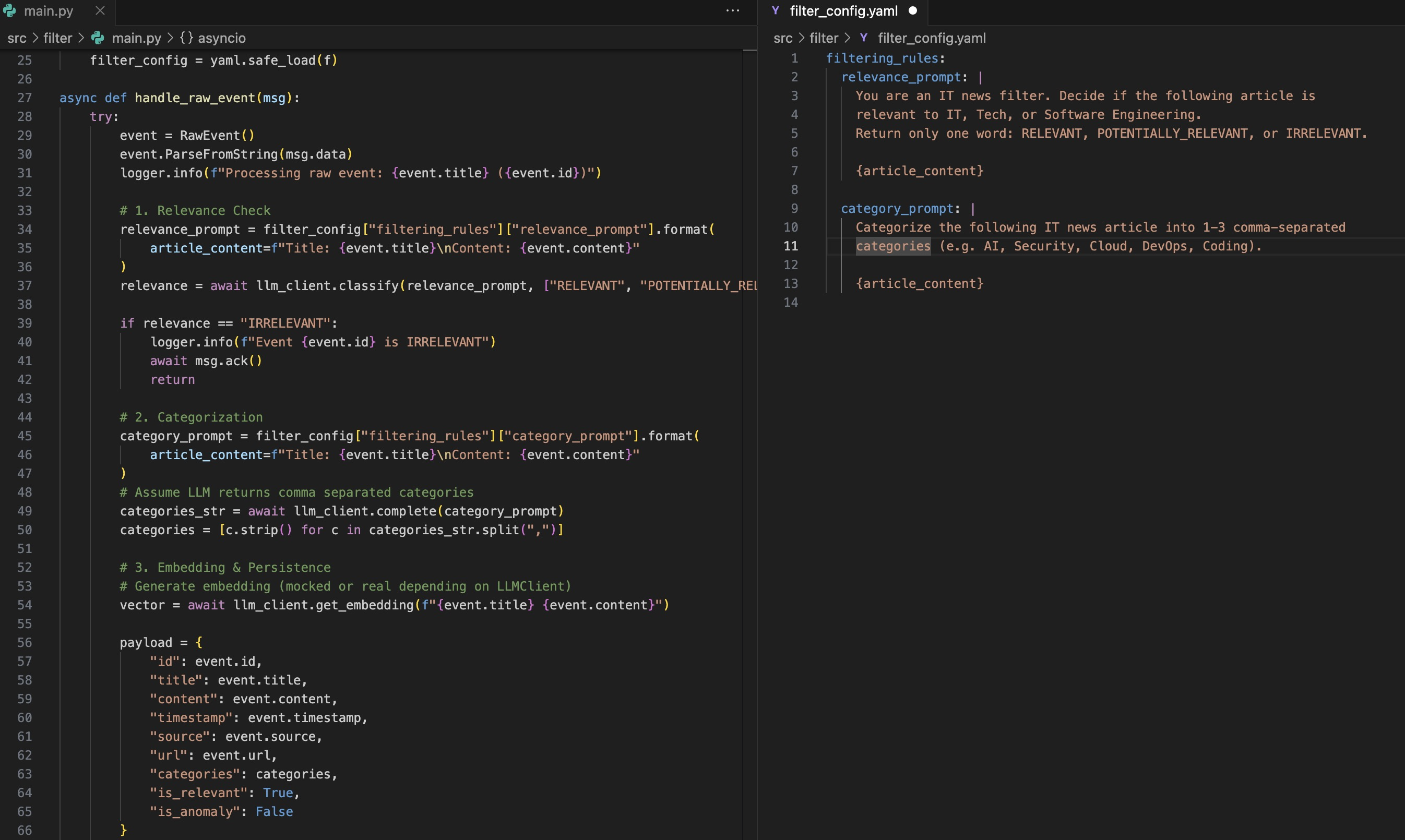 Split view of filter/main.py and filter/filter_config.yaml
What Else Did It Build?
I only showed you one service (Filter), but the same level of quality exists across all 8:
API Service (src/api/main.py):
- FastAPI with proper dependency injection
- Routes for
/ingest,/news,/news/filtered,/news/ranked,/sources(CRUD) - Publishes
new.sourceandremoved.sourceevents when sources change - Lifespan management ensuring NATS streams exist on startup
Scheduler Service:
- Uses APScheduler to poll sources at configured intervals
- Subscribes to
new.source/removed.sourceto dynamically add/remove jobs - Emits
poll.sourcemessages via NATS
Connector Service:
- Playwright-based web scraping with configurable selectors
- Deduplication using PostgreSQL
processed_itemstable - Publishes
RawEventmessages to NATS
Ranker, Inspector, Guardian:
- All follow the same NATS subscriber pattern
- Configuration-driven (YAML files)
- Proper error handling and health checks
Web Service (Streamlit):
- Talks only to the API (no direct DB access)
- Tabs for Sources, Ingestion, News browsing
- Filters by category, anomaly flag, date range
And it generated the deployment folder with:
docker-compose.ymlthat orchestrates all 8 services + NATS + PostgreSQL + Qdrant- Proper volume mounts for persistence
- Environment variable configuration
Comparison to “Vibe Coding”
The YouTube reviews from creators like Corbin and Prash Nayak highlight the Agent Manager and Chrome Extension features. Prash’s video shows him creating a FastAPI calculator app in minutes. Corbin demonstrates the Chrome extension recording the browser and fixing UI bugs.
Those are great demos, but they’re front-end focused. What I wanted to know was: Can it handle backend complexity?
What Corbin/Prash Showed:
- Building React landing pages with prompts like “make this look better”
- The Chrome extension “watching” the live app and auto-fixing rendering issues
- The Agent Manager UI for running multiple agents in parallel
- Free tier with Gemini 3 Pro (no credit card required)
What I Tested:
- Event-driven architecture with 8+ microservices
- Shared library patterns (DRY principle)
- NATS JetStream pub/sub messaging
- Protobuf serialization
- Vector database integration
- Configuration-driven LLM prompts
- Docker Compose orchestration
Both use cases are valid. But for AI engineers working on production systems, the ability to handle architectural complexity is what matters.
Why This Matters for AI Engineers
The key insight from both the YouTube reviews and my testing is this: Antigravity understands context at scale.
From Corbin’s review:
“The one thing that really mitigates your ability to push out code fast is usually very annoying bugs. You can get stuck on bugs for hours. But this [Chrome extension] is good… it’s going to get so good where it can interactively do manual testing for you, read backend logs, frontend logs, and solve the bug all automatically.”
From Prash’s review:
“The best thing for the user is that you use it completely for free. You can actually work with any kind of agents over here. You can do vibe coding.”
What I found:
- It doesn’t just autocomplete—it architects
- It respects constraints (NATS subjects, Protobuf schemas, DB separation)
- It generates production patterns (health checks, graceful shutdown, error handling)
- It follows specifications obsessively (my prompt was 890 lines long!)
The Chrome extension is impressive for frontend work. But the real superpower is: you can describe a complex distributed system in text, and it builds it.
The Verdict
I rebuilt Sentinel-AI from scratch with one massive prompt. The result was honestly shocking:
- ✅ All 8 microservices with proper separation of concerns
- ✅ Shared library with no code duplication
- ✅ Working Protobuf message contracts
- ✅ Configuration-driven prompts for non-developers
- ✅ Production-ready Docker Compose setup
- ✅ NATS JetStream with durable consumers
- ✅ Health checks for Kubernetes
I decided I’m going to start using Antigravity daily to see what else it’s capable of.
If you’re an AI engineer:
- Don’t just use it for UI like everyone else
- Throw your hardest architecture at it
- Test it with event-driven systems, microservices, distributed state
- See what breaks and what doesn’t
The free tier with Gemini 3 Pro makes this a no-brainer to try.
This entire blog post was written based on a real Sentinel-AI codebase generated by Google Antigravity using Gemini 3 Pro. All code snippets are actual generated output.
Try it yourself: Download Google Antigravity
Original Sentinel-AI project: github.com/gsantopaolo/sentinel-AI
Need Help with Your AI Project?
Whether you’re building a new AI solution or scaling an existing one, I can help. Book a free consultation to discuss your project.