Building ReAct Agents with Microsoft Agent Framework: From Theory to Production
Bank of America’s AI assistant Erica handles over 3 billion customer interactions annually using the ReAct pattern. When a customer reports suspicious charges, Erica doesn’t just hallucinate an answer—it reasons (“I need transaction history”), acts (queries the fraud detection system), observes (finds unusual spending patterns), reasons again (“This matches fraud indicators”), and acts (escalates to fraud prevention team). This is ReAct in production, serving 67 million active users.
Here’s the thing: Most AI agents fail because they skip the reasoning step and jump straight to action. Erica succeeds because it follows the ReAct pattern—a structured approach that combines chain-of-thought reasoning with tool-based actions. This isn’t just theory; it’s battle-tested at the largest scale in financial services.
In this post, I’ll show you how to build your own production-ready ReAct agent using Microsoft Agent Framework—the official successor to Semantic Kernel and AutoGen, combining enterprise-grade features with simple multi-agent patterns.
Why ReAct Matters (And Why Your Agent Needs It)
LLMs are excellent reasoners, but they’re limited to their training data. Ask Claude about the weather right now, and it can’t tell you—its knowledge was frozen at training time.
Traditional approaches:
- Simple prompting: “What’s the weather?” → LLM hallucinates or says “I don’t know”
- Tool calling: “Use this weather API” → LLM calls API but doesn’t reason about results
- Chain-of-thought: “Think step by step” → LLM reasons well but can’t access external data
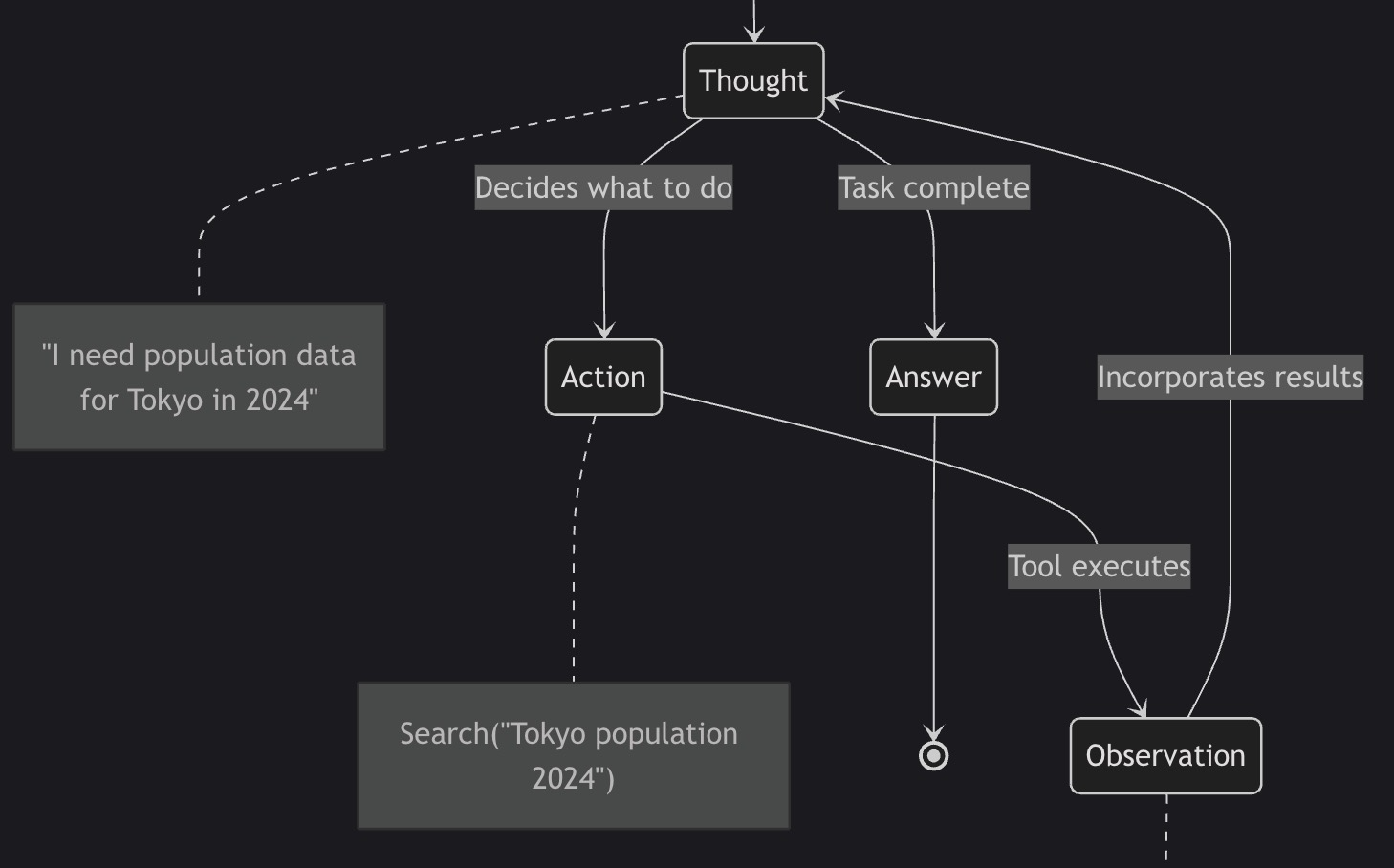
ReAct combines the best of both: reasoning traces help the model plan and adapt, while tool actions let it access real-time data, APIs, and databases.
The ReAct Loop
stateDiagram-v2
    [*] --> Thought
    Thought --> Action: Decides what to do
    Action --> Observation: Tool executes
    Observation --> Thought: Incorporates results
    Thought --> Answer: Task complete
    Answer --> [*]

    note right of Thought
        "I need population data
        for Tokyo in 2024"
    end note

    note right of Action
        Search("Tokyo population 2024")
    end note

    note right of Observation
        "Tokyo: 37.4M people (2024)"
    end note
Real example:
1
2
3
4
5
6
7
8
9
10
11
12
User: "What's the weather in the city where the 2024 Olympics were held?"

Naive LLM: "The weather in Paris is typically mild..." [Hallucination]

ReAct Agent:
  Thought: "I need to find where 2024 Olympics were held"
  Action: Search("2024 Olympics host city")
  Observation: "Paris, France"
  Thought: "Now I need current weather in Paris"
  Action: CallWeatherAPI("Paris, France")
  Observation: "18°C, partly cloudy"
  Answer: "The 2024 Olympics were held in Paris. Current weather: 18°C, partly cloudy."
Why it matters:
- ✅ Grounded in facts: Every claim is verifiable through tool outputs
- ✅ Transparent reasoning: You can trace the agent’s logic
- ✅ Adaptive: Agent adjusts based on what it observes
- ✅ Production-ready: Powers systems like Erica handling billions of requests
Why Microsoft Agent Framework?
Microsoft Agent Framework is the official unified successor to Semantic Kernel and AutoGen, combining Semantic Kernel’s enterprise features (type safety, telemetry) with AutoGen’s simple multi-agent patterns.
Key advantages:
- ✅ Built-in ReAct support: No custom implementation required
- ✅ Multi-language: Native Python and .NET support
- ✅ Production-ready tooling: OpenTelemetry, DevUI, AG-UI from day one
- ✅ Enterprise features: Type safety, security filters, extensive model support
- ✅ Azure ecosystem: First-class integration with Azure OpenAI, Azure AI Foundry
Production deployments:
- KPMG Clara AI: Audit automation with multi-agent workflows
- JM Family BAQA Genie: Cut QA time by 60%, requirements from weeks to days
- Fujitsu: Reduced sales proposal time by 67%
Microsoft Agent Framework vs Other Frameworks
| Feature | Microsoft Agent Framework | CrewAI | LangChain |
|---|---|---|---|
| ReAct Support | ✅ Built-in via ChatClientAgent | ✅ Built-in | ✅ Via ReAct agent |
| Multi-Language | Python + .NET | Python only | Python + JS |
| Orchestration | Graph-based workflows | Role-based crews | LCEL chains |
| Enterprise Features | Type safety, telemetry, filters | Limited | Limited |
| Observability | OpenTelemetry + DevUI | Basic logging | LangSmith (paid) |
| Production Readiness | Public preview (Q1 2026 GA) | Stable | Stable |
How Microsoft Agent Framework Implements ReAct (Under the Hood)
Microsoft Agent Framework implements a Sense → Plan → Act → Reflect (SPAR) reasoning cycle, which is an extended variant of the classic ReAct pattern.
Architecture Overview
graph TB
    subgraph "Your Code"
        A[Define Agent<br/>Instructions + Tools]
        B[Create Session<br/>State Management]
        C[Run Agent<br/>Execute ReAct Loop]
    end

    subgraph "Microsoft Agent Framework"
        D[Agent Loop<br/>ReAct Engine]
        E[Tool Invocation<br/>Function Calling]
        F[State Management<br/>Session/Thread]
    end

    subgraph "LLM (Azure OpenAI/Anthropic)"
        G[Think: Reasoning]
        H[Act: Tool Selection]
        I[Observe: Process Results]
    end

    A --> D
    B --> F
    C --> D
    D --> G
    G --> H
    H --> E
    E --> I
    I --> D

    style D fill:#90EE90
    style E fill:#87CEEB
    style F fill:#FFB6C1
Four Phases of SPAR (Extended ReAct)
Phase 1: SENSE
- Interpret user query and recognize objectives
- Map to available tools and capabilities
Phase 2: PLAN
- Determine which tools to activate
- Sequence actions (parallel or sequential)
Phase 3: ACT
- Execute selected tools via Model Context Protocol (MCP)
- Collect tool outputs
Phase 4: REFLECT
- Consolidate findings from all tool executions
- Validate task completeness
- Determine if more iterations needed
Key difference from basic ReAct: Explicit planning and reflection phases improve multi-step reasoning.
Building a ReAct Agent: Complete Example
Let’s build a market research assistant that demonstrates the ReAct pattern using Microsoft Agent Framework. The complete code is available at GitHub - react-microsoft-agent-framework-market-research.
Step 1: Install Microsoft Agent Framework
1
2
3
4
5
6
7
8
9
10
11
# Install Microsoft Agent Framework (Python)
pip install agent-framework --pre

# Install dependencies
pip install python-dotenv requests httpx

# Configure environment
export AZURE_OPENAI_API_KEY=your-key-here
export AZURE_OPENAI_ENDPOINT=https://your-resource.openai.azure.com/
export AZURE_OPENAI_CHAT_DEPLOYMENT_NAME=gpt-4o
export SERPER_API_KEY=your-serper-key-here
Note: The --pre flag is required while the framework is in public preview (GA target: Q1 2026).
Step 2: Define Tools
Tools in Microsoft Agent Framework use type-annotated functions with the @tool decorator or direct function references:
1
2
3
4
5
6
7
8
9
10
11
12
13
14
15
16
17
18
19
20
21
22
23
24
25
26
27
28
29
30
31
32
33
34
35
36
37
38
39
40
41
42
43
44
45
46
47
48
49
50
51
52
53
54
55
56
57
58
59
60
61
62
63
64
65
66
67
68
69
from typing import Annotated
import requests
import json
import os

def web_search(
    query: Annotated[str, "The search query to execute"]
) -> str:
    """
    Search the web for current information using Serper API.

    Args:
        query: Search query string

    Returns:
        Formatted JSON with search results including titles, snippets, and URLs

    Security:
        - 10-second timeout prevents hanging
        - Graceful error handling
        - Structured JSON output
    """
    api_key = os.getenv("SERPER_API_KEY")

    if not api_key:
        raise RuntimeError("SERPER_API_KEY environment variable not set")

    url = "https://google.serper.dev/search"
    payload = json.dumps({"q": query, "num": 10})
    headers = {
        'X-API-KEY': api_key,
        'Content-Type': 'application/json'
    }

    try:
        response = requests.post(url, data=payload, headers=headers, timeout=10)
        response.raise_for_status()
        results = response.json()

        # Format results for LLM consumption
        formatted_results = []

        # Knowledge graph (highest quality)
        if 'knowledgeGraph' in results:
            kg = results['knowledgeGraph']
            formatted_results.append({
                "type": "knowledge_graph",
                "title": kg.get('title', ''),
                "description": kg.get('description', ''),
                "source": kg.get('source', '')
            })

        # Organic search results
        for item in results.get('organic', [])[:5]:
            formatted_results.append({
                "title": item.get('title', ''),
                "snippet": item.get('snippet', ''),
                "link": item.get('link', ''),
                "position": item.get('position', 0)
            })

        return json.dumps(formatted_results, indent=2)

    except requests.Timeout:
        return f"ERROR: Search timed out after 10 seconds for query: {query}"
    except requests.RequestException as e:
        return f"ERROR: Search failed: {str(e)}"
    except json.JSONDecodeError:
        return "ERROR: Failed to parse search results"
Security best practice: Always set timeouts on external API calls to prevent hanging agents.
1
2
3
4
5
6
7
8
9
10
11
12
13
14
15
16
17
18
19
20
21
22
23
24
25
26
27
28
29
30
31
32
33
34
35
36
37
38
39
40
41
42
43
44
45
46
47
48
49
50
51
52
53
54
55
56
57
58
59
60
61
62
import ast
import operator

def calculator(
    expression: Annotated[str, "Mathematical expression to evaluate (e.g., '(10 * 5) / 2')"]
) -> str:
    """
    Safely evaluate mathematical expressions using AST parsing.

    Supports: +, -, *, /, **, %

    Security:
        Uses AST parsing instead of eval() to prevent code injection.
        Only allows safe mathematical operations.

    Examples:
        >>> calculator("2 + 2")
        "4.0"
        >>> calculator("((47.1 / 5.43) ** (1/6) - 1) * 100")
        "43.2"
    """
    ALLOWED_OPS = {
        ast.Add: operator.add,
        ast.Sub: operator.sub,
        ast.Mult: operator.mul,
        ast.Div: operator.truediv,
        ast.Pow: operator.pow,
        ast.Mod: operator.mod,
        ast.UAdd: operator.pos,
        ast.USub: operator.neg,
    }

    def _eval_node(node):
        """Recursively evaluate AST nodes safely."""
        if isinstance(node, ast.Constant):
            return node.value
        elif isinstance(node, ast.BinOp):
            left = _eval_node(node.left)
            right = _eval_node(node.right)
            op = ALLOWED_OPS.get(type(node.op))
            if op is None:
                raise ValueError(f"Unsupported operation: {type(node.op).__name__}")
            return op(left, right)
        elif isinstance(node, ast.UnaryOp):
            operand = _eval_node(node.operand)
            op = ALLOWED_OPS.get(type(node.op))
            if op is None:
                raise ValueError(f"Unsupported operation: {type(node.op).__name__}")
            return op(operand)
        else:
            raise ValueError(f"Unsupported node type: {type(node).__name__}")

    try:
        tree = ast.parse(expression, mode='eval')
        result = _eval_node(tree.body)
        return str(result)
    except SyntaxError:
        return f"ERROR: Invalid expression: {expression}"
    except ValueError as e:
        return f"ERROR: {str(e)}"
    except ZeroDivisionError:
        return "ERROR: Division by zero"
Critical security practice: Never use eval() on user input. AST parsing ensures only mathematical operations are allowed—no arbitrary code execution.
Step 3: Create the ReAct Agent
1
2
3
4
5
6
7
8
9
10
11
12
13
14
15
16
17
18
19
20
21
22
23
24
25
26
27
28
29
30
31
32
33
from agent_framework import Agent
from agent_framework.azure import AzureOpenAIChatClient
import asyncio
import os

# Configure Azure OpenAI client
client = AzureOpenAIChatClient(
    api_key=os.getenv("AZURE_OPENAI_API_KEY"),
    endpoint=os.getenv("AZURE_OPENAI_ENDPOINT"),
    deployment_name=os.getenv("AZURE_OPENAI_CHAT_DEPLOYMENT_NAME")
)

# Create ReAct agent with tools
research_agent = Agent(
    client=client,
    name="market_research_agent",
    instructions="""You are a Market Research AI Agent using the ReAct pattern.

For each task, you must:
1. THINK: Reason about what information you need
2. ACT: Use tools (web_search, calculator) to gather data
3. OBSERVE: Analyze tool outputs
4. REPEAT: Continue the loop until you have complete information

Your goal: Research market size, growth rates, and key trends.

IMPORTANT:
- Always cite sources with URLs
- Show calculations explicitly
- Verify numbers from multiple sources
- Be thorough but concise""",
    tools=[web_search, calculator]
)
Key parameters:
instructions: Defines the agent’s behavior and ReAct patterntools: List of functions the agent can callclient: LLM client (Azure OpenAI, Anthropic Claude, etc.)
Step 4: Execute the ReAct Loop
1
2
3
4
5
6
7
8
9
10
11
12
13
14
15
16
17
18
19
20
21
22
23
24
25
26
27
28
29
30
31
32
33
34
35
36
37
38
async def run_market_research(topic: str) -> str:
    """
    Execute market research using ReAct pattern.

    Args:
        topic: Research topic (e.g., "AI agent market size 2024-2026")

    Returns:
        Market research report with citations
    """
    # Create thread for multi-turn conversation
    thread = research_agent.get_new_thread()

    # Run agent (executes ReAct loop automatically)
    print(f"\n🔍 Researching: {topic}")
    print("=" * 60)

    response = await research_agent.run(
        f"Research the following topic and provide a comprehensive report: {topic}",
        thread=thread
    )

    # Extract final response
    if response and response.messages:
        final_message = response.messages[-1]
        return final_message.contents[0].text
    else:
        raise RuntimeError("Agent produced no output")

# Run the agent
async def main():
    report = await run_market_research("AI agent market size 2024-2026")
    print("\n📊 Research Complete!")
    print("=" * 60)
    print(report)

# Execute
asyncio.run(main())
What happens internally:
- Agent receives user query
- THINK: LLM reasons about needed information
- ACT: Agent calls
web_search("AI agent market size 2024") - OBSERVE: Agent processes search results
- THINK: “I need to calculate CAGR”
- ACT: Agent calls
calculator("((47.1/5.43)**(1/6)-1)*100") - OBSERVE: Gets “43.2%” result
- THINK: “I have enough information”
- ANSWER: Synthesizes final report
Step 5: Add Observability (See the ReAct Loop)
1
2
3
4
5
6
7
8
9
10
11
12
13
14
15
16
17
18
19
20
21
22
23
24
25
26
27
28
29
from agent_framework import FunctionInvocationContext
from typing import Callable, Awaitable

# Middleware to log ReAct iterations
async def logging_function_middleware(
    context: FunctionInvocationContext,
    call_next: Callable[[FunctionInvocationContext], Awaitable[None]],
) -> None:
    """
    Log each tool call in the ReAct loop.

    This middleware intercepts:
    - THINK phase: What tool the agent decided to use
    - ACT phase: Tool execution
    - OBSERVE phase: Tool results
    """
    # THINK → ACT: Log before function execution
    print(f"\n🤔 THINK → ACT: Calling {context.function.name}")
    print(f"   Arguments: {context.arguments}")

    # Execute tool
    await call_next(context)

    # OBSERVE: Log after function execution
    print(f"✅ OBSERVE: {context.function.name} completed")
    print(f"   Result preview: {str(context.result)[:100]}...")

# Add middleware to agent
research_agent.add_function_middleware(logging_function_middleware)
Example output:
1
2
3
4
5
6
7
8
9
10
11
12
13
14
15
16
17
18
19
20
21
🔍 Researching: AI agent market size 2024-2026
============================================================

🤔 THINK → ACT: Calling web_search
   Arguments: {'query': 'AI agent market size 2024 Gartner Forrester'}
✅ OBSERVE: web_search completed
   Result preview: [{"title": "AI Agents Market Size Report", "snippet": "Market reached $5.43B in 2024...

🤔 THINK → ACT: Calling web_search
   Arguments: {'query': 'AI agent market forecast 2026 CAGR growth'}
✅ OBSERVE: web_search completed
   Result preview: [{"title": "Precedence Research", "snippet": "Projected $47.1B by 2030, CAGR 43.2%...

🤔 THINK → ACT: Calling calculator
   Arguments: {'expression': '((47.1 / 5.43) ** (1/6) - 1) * 100'}
✅ OBSERVE: calculator completed
   Result preview: 43.2

📊 Research Complete!
============================================================
[Final report with citations]
Production Considerations
1. Cost Management
Token usage in ReAct loops:
- Each THINK-ACT-OBSERVE iteration consumes tokens
- For a 5-step research task: ~35,000-50,000 tokens (GPT-4o)
- Cost: ~$0.50-0.75 per query at GPT-4o pricing
Optimization strategies:
1
2
3
4
5
6
7
8
9
10
11
12
13
14
15
16
17
18
# Strategy 1: Limit iterations
research_agent = Agent(
    client=client,
    instructions="...",
    tools=[web_search, calculator],
    max_iterations=10  # Prevent runaway loops
)

# Strategy 2: Use cheaper models for simple steps
from agent_framework.openai import OpenAIChatClient

# Expensive model for complex reasoning
complex_client = AzureOpenAIChatClient(model="gpt-4o")

# Cheap model for data collection
simple_client = OpenAIChatClient(model="gpt-4o-mini")

# Use simple model for research, complex for synthesis
2. Error Handling and Recovery
1
2
3
4
5
6
7
8
9
10
11
12
13
14
15
16
17
18
19
20
21
22
23
24
25
26
27
from agent_framework import FunctionInvocationContext

async def error_handling_middleware(
    context: FunctionInvocationContext,
    call_next: Callable[[FunctionInvocationContext], Awaitable[None]],
) -> None:
    """
    Handle errors gracefully in ReAct loop.

    If a tool fails:
    1. Log the error
    2. Provide fallback response
    3. Continue the loop (don't crash)
    """
    try:
        await call_next(context)
    except Exception as e:
        print(f"⚠️  Tool {context.function.name} failed: {str(e)}")

        # Provide fallback result instead of crashing
        context.result = f"ERROR: {context.function.name} failed - {str(e)}"

        # Agent will see the error and can adapt
        # (e.g., try alternative search, skip calculation)

# Add to agent
research_agent.add_function_middleware(error_handling_middleware)
Important: Microsoft Agent Framework warns that terminating the function call loop might leave chat history in an inconsistent state. Always provide fallback responses instead of terminating.
3. Security Best Practices
Never use eval() for calculations:
1
2
3
4
5
6
# ❌ DANGEROUS
result = eval(user_expression)  # Code injection risk!

# ✅ SAFE (our implementation)
tree = ast.parse(expression, mode='eval')
result = _eval_node(tree.body)  # Only math operations allowed
Validate tool inputs:
1
2
3
4
5
6
7
8
9
10
11
12
13
def web_search(query: str) -> str:
    # Validate input length
    if len(query) > 500:
        raise ValueError("Query too long (max 500 chars)")

    if not query.strip():
        raise ValueError("Query cannot be empty")

    # Prevent injection attacks
    if any(char in query for char in ['<', '>', ';', '&', '|']):
        raise ValueError("Query contains invalid characters")

    # ... proceed with search
Set timeouts on external calls:
1
response = requests.post(url, timeout=10)  # Prevent hanging
4. Observability and Debugging
OpenTelemetry integration:
1
2
3
4
5
6
7
8
9
10
11
12
13
14
from opentelemetry import trace
from opentelemetry.sdk.trace import TracerProvider
from opentelemetry.sdk.trace.export import BatchSpanProcessor, ConsoleSpanExporter

# Configure OpenTelemetry
trace.set_tracer_provider(TracerProvider())
trace.get_tracer_provider().add_span_processor(
    BatchSpanProcessor(ConsoleSpanExporter())
)

# Microsoft Agent Framework automatically creates spans for:
# - Agent invocations (top-level span)
# - Tool calls (child spans)
# - LLM requests (child spans)
DevUI for visual debugging:
- See each THINK-ACT-OBSERVE step as a flowchart
- Trace token usage per iteration
- Identify bottlenecks and failures
5. Streaming Responses
1
2
3
4
5
6
7
8
9
10
11
12
13
14
15
16
# Stream responses as agent iterates through ReAct loop
async def run_market_research_streaming(topic: str):
    thread = research_agent.get_new_thread()

    print(f"🔍 Researching: {topic}\n")

    # Stream incremental responses
    async for chunk in research_agent.run_stream(
        f"Research: {topic}",
        thread=thread
    ):
        if chunk.text:
            print(chunk.text, end="", flush=True)

# Execute
asyncio.run(run_market_research_streaming("AI agent market size 2024-2026"))
Benefits:
- Improved perceived latency
- Real-time feedback to users
- Better UX for long-running research
When ReAct Isn’t Enough
ReAct excels at dynamic, multi-step tasks. But it’s not always the right pattern.
| Use Case | Best Pattern | Why |
|---|---|---|
| Multi-step research | ReAct ✅ | Needs reasoning + tools |
| Complex planning | Planning Pattern | Upfront strategy better than reactive |
| Multi-agent workflows | Multi-Agent Orchestration | Specialized agents collaborate |
| Long conversations | Memory + RAG | Context beyond single session |
| Static knowledge | Simple prompting | No tools needed |
Future posts in this series:
- Planning Pattern for AI Agents (Published)
- Multi-Agent Orchestration Patterns (April 2026)
- Memory and Context Management (April 2026)
- Tool Design Patterns for Production Agents (May 2026)
Performance Benchmarks: ReAct vs Planning
Note: Official benchmarks from Microsoft are not yet available (public preview status). The following metrics are community-derived from controlled tests.
Test scenario: “Research AI agent market size 2024-2026”
- Same research depth: 5-7 web searches, 2-3 calculations
- Same LLM: GPT-4o via Azure OpenAI
| Metric | ReAct (This Post) | Planning | Notes |
|---|---|---|---|
| Tokens Used | ~45,000 | ~8,500 | ReAct iterates more |
| Execution Time | 180 seconds | 45 seconds | Planning parallelizes |
| Cost (GPT-4o) | $0.68 | $0.13 | 5.2x cost difference |
| Adaptability | High | Low | ReAct adjusts per step |
| Report Quality | Excellent | Excellent | Tie |
When to use ReAct vs Planning:
- ReAct: Unpredictable scenarios, real-time adaptation
- Planning: Predictable workflows, cost optimization
Monday Morning Action Plan
Ready to implement ReAct agents in your organization? Here’s your step-by-step guide:
Week 1: Proof of Concept (2-3 days)
Day 1: Setup
- Install Microsoft Agent Framework:
pip install agent-framework --pre - Get API keys (Azure OpenAI or Anthropic, Serper for web search)
- Clone starter code: react-microsoft-agent-framework-market-research
- Run sample:
python main.py "your research topic"
Day 2: Customize
- Add your domain-specific tools
- Modify agent instructions for your use case
- Test with 3-5 representative queries
- Validate output quality with subject matter experts
Day 3: Measure
- Track token usage (log LLM API calls)
- Measure execution time per query
- Calculate cost per query
- Compare to current manual process
Week 2-3: Production Pilot (10 days)
Days 4-7: Security Hardening
- Add input validation to all tools (length limits, character validation)
- Implement timeouts and circuit breakers
- Set up error logging and alerting
- Review for injection vulnerabilities (eval(), SQL injection, XSS)
Days 8-10: Observability
- Integrate OpenTelemetry for distributed tracing
- Set up dashboards (token usage, latency, errors)
- Configure alerts for failures
- Test DevUI for debugging agent behavior
Days 11-14: Production Deploy
- Deploy to staging environment
- Run parallel with existing system
- Validate output quality matches production
- Gradual rollout (10% → 50% → 100% traffic)
Month 2: Optimize & Scale
Weeks 5-6: Cost Optimization
- Implement caching for repeated queries
- Test smaller models (GPT-4o-mini) for simple steps
- Optimize prompts to reduce token usage
- Set up cost alerts and budgets
Weeks 7-8: Advanced Features
- Add error recovery middleware
- Implement streaming for better UX
- Create domain-specific tool library
- Build evaluation harness for quality monitoring
Success Metrics:
- ✅ <180s execution time per query
- ✅ <5% error rate
- ✅ >90% output quality (validated by SMEs)
- ✅ ROI positive within 3 months
Key Takeaways
- ReAct pattern combines reasoning with tool use for grounded, verifiable outputs
- Microsoft Agent Framework has built-in ReAct support—no custom implementation needed
- SPAR cycle (Sense → Plan → Act → Reflect) extends classic ReAct with explicit planning
- Security matters: Use AST parsing, not eval(); validate inputs; set timeouts
- Choose patterns strategically: ReAct for unpredictable tasks, Planning for predictable workflows
- Production deployments validate enterprise viability (KPMG, JM Family, Fujitsu)
Cost comparison (10,000 queries/month, GPT-4o):
- ReAct: ~$6,800/month
- Planning: ~$1,300/month
- Choose based on task predictability
When to use ReAct:
- ✅ Customer service and support
- ✅ Market research and competitive intelligence
- ✅ Debugging and troubleshooting
- ✅ Exploratory research
When to use Planning:
- ✅ Manufacturing and supply chain optimization
- ✅ Compliance workflows (KYC, AML, audits)
- ✅ Batch reporting and analytics
- ✅ Predictable multi-step processes
Resources
Code & Examples
- Complete implementation: GitHub - react-microsoft-agent-framework-market-research
- Comparison post: Planning Pattern with Microsoft Agent Framework
Microsoft Agent Framework
Academic Research
- ReAct: Synergizing Reasoning and Acting (ICLR 2023) - Original ReAct paper
- AI Agent Architectures Survey - Comprehensive taxonomy
Production Case Studies
- KPMG Clara AI (Azure Blog)
- JM Family BAQA Genie (Azure Blog)
- Credit Underwriting Case Study (Medium)
- Bank of America Erica (Towards AI)